


How do I log in to my Business Internet Banking for the first time?
Log in to Business Internet Banking for the first time:
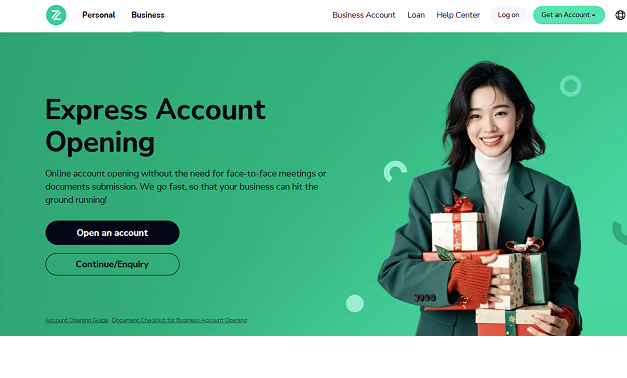
- You can log into ZA Bank's official website (bank.za.group) and click on the main menu on the top left: "Business"> "Log on "
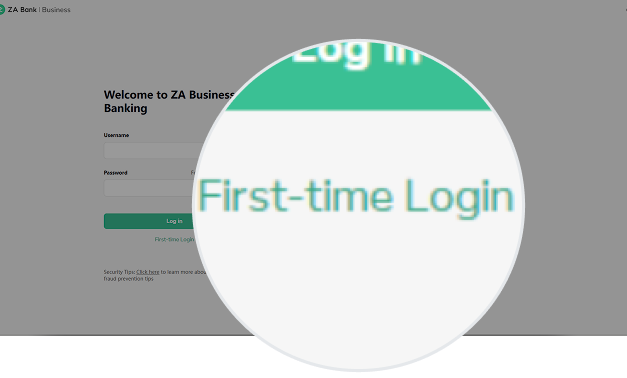
- Click on "First-time Login"
💡 Please follow the 4 steps below to complete the first-time login process for Business Internet Banking:
- Enter User ID: After successfully opening an account, a customer will receive a welcome email from the bank, as well as an SMS message containing the password to open the attachment in the welcome email. (The email attachment contains the "User ID" information.)
- Answer the Identity Verification Questions: You need to answer 3 identity verification questions.
- Verify Mobile Number: Enter the 6-digit one-time verification code that we send to your phone.
- Set Up User ID and Password.
01.
"Business"> "Log on "
02.
Click on "First-time Login"
01.
"Business"> "Log on "
02.
Click on "First-time Login"
01.
"Business"> "Log on "
02.
Click on "First-time Login"
01.
"Business"> "Log on "
02.
Click on "First-time Login"
01.
"Business"> "Log on "
02.
Click on "First-time Login"
01.
"Business"> "Log on "
02.
Click on "First-time Login"
Can this answer address your question?
YesNo
Questions related to "Internet Banking" Questions related to
How can I apply for ZA Bank Business Internet Banking services?I've forgotten my business banking login details, what should I do?Why can't I log on to the business internet banking?How do I check the transaction records of my business banking account?How can I view and request my business banking account statement? What information does the statement include?
If you need further assistance,feel free to online chat with us




- Apple is a trademark of Apple Inc., registered in the U.S.and other countries. App Store is a service mark of Apple Inc.
- Google Play™ is a Trademark of Google LLC.
